
Compatibility
Minecraft: Java Edition
Platforms


Creators

Details
Auction House Plugin
Use /ah to open the auction house.
Dependent plugins:
- Vault
- Any Ecomony Plugin (for example Essentials or BetterEconomy)
Admins on the server can also use /ah admin [opens the ah, but if you click on an item you can delete it from the ah] /ah ban [make a player unable to use /ah]
For the commands a description is provided in-game. If you aren't op on the server and want to use permissions to access these commands, the current permission is called "auctionhouse.moderator"
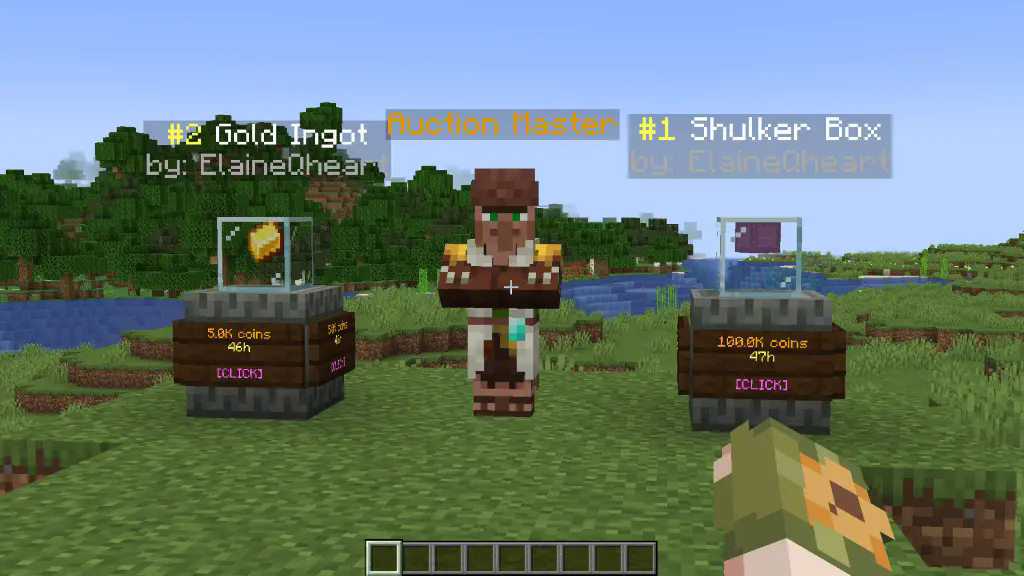 To set up an auction use /ah sell <price>
config.yml
tax: 0.01                                   # 1% tax
auction-setup-time: 30                      # the time it takes to put an item on auction
default-max-auctions: 10
sold-message: true                          # send a message to the player when one of their auctions is sold
auto-collect: false                         # automatically gives the money to the player when an auction is bought and removes it from the ah
partial-selling: false                      # allows players to select the amount of items they want to buy of an auction
admin-permission: "auctionhouse.moderator"
display-update: 20                          # 20 ticks = 1 second, how frequently the item displays are updated; can be set to 1 for instant updates
auction-announcements: true                 # announce when someone puts an item on auction (players can toggle this with /ah announce)
bin-auctions: true                          # BIN = Buy It Now [/ah sell <amount>]
bin-auction-duration: 172800                # the time an auction lasts in seconds (60*60*48 = 172800)
min-bin: 1                                  # the minimum sell price
bid-auctions: true                          # enables actual auctions by typing [/ah bid <amount>]
bid-auction-duration: 7200                  # the time a bidding auction lasts in seconds (60*60*2 = 7200)
min-bid: 1                                  # the minimum bid price
last-bid-extra-time: 60                     # if the auction time is less than this when a bid is placed, it's set to this
bid-increase-percent: 25                    # how much each bid has to increase at least
Example of permissions.yml file
# the default auction slots and duration can be edited in the config.yml file
# by default this is empty. To add ranks/permissions, add them like so:

auction-slots:
  vip: 12
  mvp: 15
  custom.example.permission: 50
auction-duration:
  vip: 259200                           # 60*60*24*3 = 3 days
  mvp: 345600                           # 60*60*24*4 = 4 days
  custom.example.permission: 432000     # 5 days
colour codes used in the messages.yml
# §k obfuscated
# §l bold
# §m strikethrough
# §n underline
# §o italic
# §r reset
# &n new line

# §0: Black
# §1: Dark Blue
# §2: Dark Green
# §3: Dark Aqua
# §4: Dark Red
# §5: Dark Purple
# §6: Gold
# §7: Gray
# §8: Dark Gray
# §9: Blue
# §a: Green
# §b: Aqua
# §c: Red
# §d: Light Purple
# §e: Yellow
# §f: White
layout.yml
# You can replace any character with another or even remove a line to change the layout. The spaces between the characters are there to make it clearer. The characters are defined down below.
ah-layout:
  - '# # # # # # # # #'
  - '# . . . . . . . #'
  - '# . . . . . . . #'
  - '# . . . . . . . #'
  - '# # # # # # # # #'
  - 's o # p r n # f m'
my-ah-layout:
  - '# # # # # # # # #'
  - '# . . . . . . . #'
  - '# . . . . . . . #'
  - '# . . . . . . . #'
  - '# # # # # # # # #'
  - 'b o # p r n # d i'
'#':
  ==: org.bukkit.inventory.ItemStack
  DataVersion: 4325
  id: minecraft:black_stained_glass_pane
  count: 1
  components:
    minecraft:tooltip_display: '{hide_tooltip:1b}'
  schema_version: 1
s:
  ==: org.bukkit.inventory.ItemStack
  DataVersion: 4325
  id: minecraft:oak_sign
  count: 1
  schema_version: 1
active-search:
  ==: org.bukkit.inventory.ItemStack
  DataVersion: 4325
  id: minecraft:spruce_sign
  count: 1
  schema_version: 1
o:
  ==: org.bukkit.inventory.ItemStack
  DataVersion: 4325
  id: minecraft:hopper
  count: 1
  schema_version: 1
p:
  ==: org.bukkit.inventory.ItemStack
  DataVersion: 4325
  id: minecraft:arrow
  count: 1
  schema_version: 1
r:
  ==: org.bukkit.inventory.ItemStack
  DataVersion: 4325
  id: minecraft:nether_star
  count: 1
  schema_version: 1
n:
  ==: org.bukkit.inventory.ItemStack
  DataVersion: 4325
  id: minecraft:arrow
  count: 1
  schema_version: 1
m:
  ==: org.bukkit.inventory.ItemStack
  DataVersion: 4325
  id: minecraft:ender_chest
  count: 1
  schema_version: 1
b:
  ==: org.bukkit.inventory.ItemStack
  DataVersion: 4325
  id: minecraft:arrow
  count: 1
  schema_version: 1
i:
  ==: org.bukkit.inventory.ItemStack
  DataVersion: 4325
  id: minecraft:paper
  count: 1
  schema_version: 1
f:
  ==: org.bukkit.inventory.ItemStack
  DataVersion: 4325
  id: minecraft:powered_rail
  count: 1
  schema_version: 1
d:
  ==: org.bukkit.inventory.ItemStack
  DataVersion: 4325
  id: minecraft:golden_carrot
  count: 1
  schema_version: 1
bin-filter-bin:
  ==: org.bukkit.inventory.ItemStack
  DataVersion: 4325
  id: minecraft:gold_ingot
  count: 1
  schema_version: 1
bin-filter-auctions:
  ==: org.bukkit.inventory.ItemStack
  DataVersion: 4325
  id: minecraft:gold_block
  count: 1
  schema_version: 1
locked-slot:
  ==: org.bukkit.inventory.ItemStack
  DataVersion: 4325
  id: minecraft:barrier
  count: 1
  schema_version: 1
back-to-my-auctions:
  ==: org.bukkit.inventory.ItemStack
  DataVersion: 4325
  id: minecraft:arrow
  count: 1
  schema_version: 1
anvil-search-paper:
  ==: org.bukkit.inventory.ItemStack
  DataVersion: 4325
  id: minecraft:paper
  count: 1
  schema_version: 1
cancel:
  ==: org.bukkit.inventory.ItemStack
  DataVersion: 4325
  id: minecraft:red_banner
  count: 1
  schema_version: 1
collect-expired-item:
  ==: org.bukkit.inventory.ItemStack
  DataVersion: 4325
  id: minecraft:red_dye
  count: 1
  schema_version: 1
cancel-auction:
  ==: org.bukkit.inventory.ItemStack
  DataVersion: 4325
  id: minecraft:red_concrete
  count: 1
  schema_version: 1
command-block-info:
  ==: org.bukkit.inventory.ItemStack
  DataVersion: 4325
  id: minecraft:structure_block
  count: 1
  schema_version: 1
admin-cancel-auction:
  ==: org.bukkit.inventory.ItemStack
  DataVersion: 4325
  id: minecraft:red_concrete
  count: 1
  schema_version: 1
admin-expire-auction:
  ==: org.bukkit.inventory.ItemStack
  DataVersion: 4325
  id: minecraft:red_dye
  count: 1
  schema_version: 1
confirm:
  ==: org.bukkit.inventory.ItemStack
  DataVersion: 4325
  id: minecraft:green_banner
  count: 1
  schema_version: 1
choose-item-buy-amount:
  ==: org.bukkit.inventory.ItemStack
  DataVersion: 4325
  id: minecraft:oak_hanging_sign
  count: 1
  schema_version: 1
dirt:
  ==: org.bukkit.inventory.ItemStack
  DataVersion: 4325
  id: minecraft:dirt
  count: 1
  schema_version: 1
turtle-scute-confirm:
  ==: org.bukkit.inventory.ItemStack
  DataVersion: 4325
  id: minecraft:turtle_scute
  count: 1
  schema_version: 1
cannot-afford:
  ==: org.bukkit.inventory.ItemStack
  DataVersion: 4325
  id: minecraft:armadillo_scute
  count: 1
  schema_version: 1
collect-sold-item:
  ==: org.bukkit.inventory.ItemStack
  DataVersion: 4325
  id: minecraft:diamond
  count: 1
  schema_version: 1
bid-history:
  ==: org.bukkit.inventory.ItemStack
  DataVersion: 4325
  id: minecraft:filled_map
  count: 1
  schema_version: 1
bid-explanation:
  ==: org.bukkit.inventory.ItemStack
  DataVersion: 4325
  id: minecraft:gold_ingot
  count: 1
  schema_version: 1
submit-bid:
  ==: org.bukkit.inventory.ItemStack
  DataVersion: 4325
  id: minecraft:gold_nugget
  count: 1
  schema_version: 1
cannot-afford-bid:
  ==: org.bukkit.inventory.ItemStack
  DataVersion: 4325
  id: minecraft:armadillo_scute
  count: 1
  schema_version: 1
top-bid:
  ==: org.bukkit.inventory.ItemStack
  DataVersion: 4325
  id: minecraft:gold_block
  count: 1
  schema_version: 1
collect-auction:
  ==: org.bukkit.inventory.ItemStack
  DataVersion: 4325
  id: minecraft:gold_block
  count: 1
  schema_version: 1
collect-coins:
  ==: org.bukkit.inventory.ItemStack
  DataVersion: 4325
  id: minecraft:gold_nugget
  count: 1
  schema_version: 1
own-bid:
  ==: org.bukkit.inventory.ItemStack
  DataVersion: 4325
  id: minecraft:poisonous_potato
  count: 1
  schema_version: 1
sounds:
  click: "UI_STONECUTTER_SELECT_RECIPE"
  open-enderchest: "BLOCK_ENDER_CHEST_OPEN"
  close-enderchest: "BLOCK_ENDER_CHEST_CLOSE"
  break-wood: "BLOCK_WOOD_BREAK"
  experience: "ENTITY_EXPERIENCE_ORB_PICKUP"
  villager-deny: "ENTITY_VILLAGER_NO"
  open-shulker: "BLOCK_SHULKER_BOX_OPEN"
  close-shulker: "BLOCK_SHULKER_BOX_CLOSE"
Q&A
Q: Can I customize messages and GUI texts? A: Yes, edit the messages.yml file in the plugin folder. You can change the currency from "coins" to whatever you like under "placeholders" in the messages.yml file.
Q: How do I update the config with new options? A: The plugin automatically adds missing config options when updated, without overwriting your custom settings.
Q: How do I spawn that Auction Master Villager and the item displays and how do I remove them? A: If you are op, then you can do /ah summon <entity> which you can tab-complete. To remove them, simply punch them while being in creative mode and being op on the server.
Q: The Auction Master Villager and the item displays disappear after a while A: If you do something like /kill @e, of course they will be removed. Also, if you use /teleport @e, they will be moved.
Q: How do I report bugs or request features? A: You can join my new discord server and contact me directly.